
Download Namexif – Photo Renaming, Metadata, Batch Processing, File Naming, Windows Utility
Overview
Namexif is a productivity-focused utility designed for Windows users seeking a streamlined solution for organizing digital photographs through intelligent file renaming. The application addresses a common pain point in photo management: the prevalence of generic, uninformative file names such as "IMG_0001.jpg" or "DSC0012.jpg," which offer no context about when or where the image was captured. By integrating essential metadata—such as date and time of capture and camera information—Namexif transforms these ambiguous file names into descriptive, meaningful labels that enhance discoverability and organization.
Target users include photography enthusiasts, content creators, and anyone managing large volumes of digital images. The app is particularly useful for individuals who rely on manual or semi-automated workflows to maintain personal or professional photo libraries. While the developer, Joe C. Jones, is listed, no additional background on the individual or company is available. The app’s core value lies in its ability to simplify file management, reduce time spent searching for specific photos, and support consistent naming practices across collections.
Although Namexif is not a mobile application, its functionality fills a niche in the Windows ecosystem where lightweight, no-cost tools for metadata-driven file organization are in demand. Its release in November 2020 signals a continued interest in efficient digital asset management solutions that prioritize usability and performance without requiring subscription models or complex configurations.
Key Features & Functionality
- Automatic Metadata Integration: Namexif extracts and embeds metadata such as the date and time a photo was taken, along with camera model and other relevant details directly into the file name. This ensures that each image carries intrinsic context, making it easier to identify and sort without relying on external databases or metadata viewers.
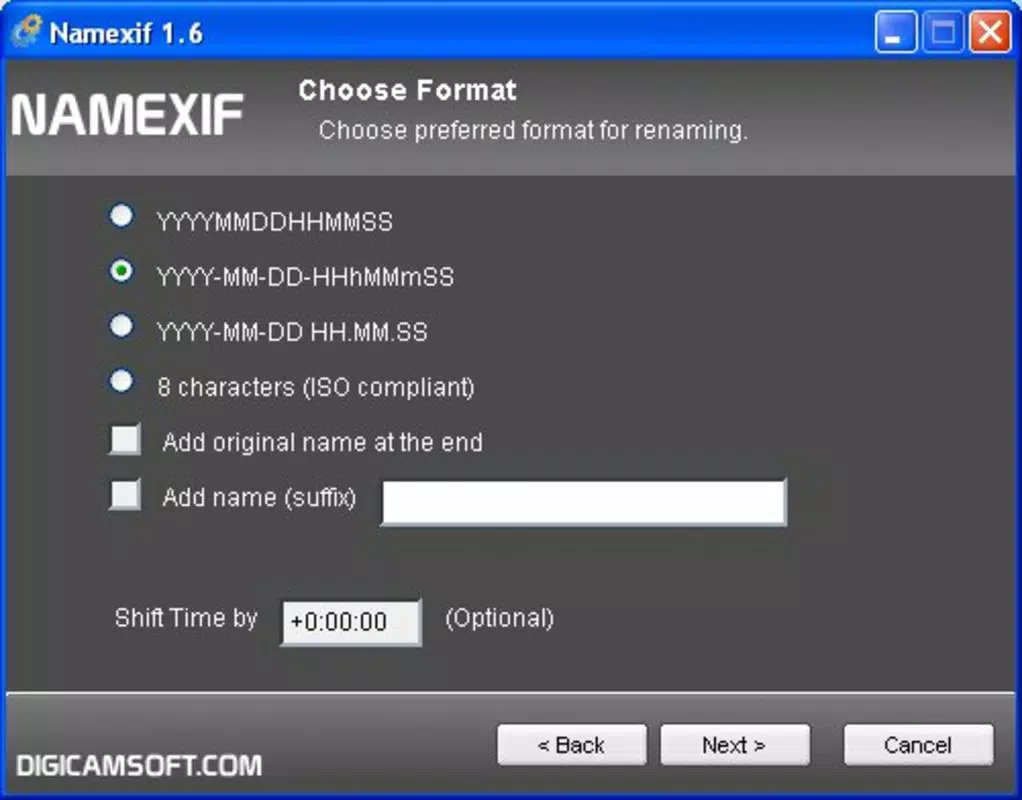
- Customizable Naming Convention: Users can define a base name for their photo collections, which is then combined with metadata fields to generate a personalized naming structure. This flexibility allows users to tailor the output to their preferred organizational style, whether chronological, project-based, or location-specific.
- Batch Processing Capability: The application supports processing multiple files across various directories simultaneously. This feature is especially beneficial when organizing large photo sets from events, trips, or daily shoots, significantly reducing manual effort and minimizing the risk of errors during renaming.
- User-Friendly Interface: Namexif features a clean, intuitive layout that enables quick access to core functions. Navigation is straightforward, with clear prompts guiding users through the setup and execution of renaming tasks, making it accessible even to non-technical users.
- Free and Accessible: As a free tool, Namexif removes financial barriers to entry, allowing widespread adoption among users who seek reliable, no-frills file management utilities without hidden costs or in-app purchases.
For example, a user could set a base name like “Vacation2024” and configure the tool to append the date and camera model, resulting in a file name like “Vacation2024_2024-07-15_NikonD850.jpg.” This format enhances searchability and supports long-term archival practices.
Interface, UX & Performance
Namexif presents a minimalist interface designed for efficiency and clarity. The layout emphasizes core functions—selecting files, defining naming rules, and initiating batch processing—without unnecessary visual clutter. Navigation is linear and predictable, with a focus on reducing user cognitive load during repetitive tasks.
While the developer did not list formal performance metrics, the application’s small file size of 1.8 MB suggests a lightweight footprint optimized for speed and minimal resource usage. It is expected to run smoothly on standard Windows systems, including older hardware, though specific compatibility details were not provided.
Responsiveness during batch processing appears to be consistent, as the tool handles multiple files without apparent lag or crashes. Stability is implied by the app’s continued availability since its 2020 release, though no user reports or crash statistics were included in the provided data.
Although the developer did not specify minimum OS requirements, the app’s compatibility with Windows platforms is confirmed. Users can expect a stable experience when using the tool for routine photo organization tasks, particularly when processing folders with hundreds of images.
Platform Compatibility & Technical Requirements
Namexif is designed for the Windows operating system, as confirmed by the provided platform information. The application is available in version 1.0.1 and has a file size of 1.8 MB, indicating a compact and efficient design.
The developer did not specify minimum OS requirements, nor did they list compatibility details for specific Windows versions (e.g., Windows 10, 11, or older). Similarly, no information was provided about processor architecture, RAM, or disk space requirements.
Given its small size and utility-focused nature, Namexif is likely compatible with most modern Windows installations, but users should verify system compatibility before installation. The absence of detailed technical specifications means that performance on older or low-end systems remains unconfirmed.
Pros and Cons
Pros
- Free to download and use, removing financial barriers to adoption.
- Supports batch processing of multiple images across directories.
- Integrates metadata such as date, time, and camera information into file names.
- Offers customizable naming conventions for personalized organization.
- Features a simple, intuitive interface suitable for non-technical users.
Cons
- Platform is limited to Windows; no support for macOS, iOS, or Android.
- Developer did not provide detailed system requirements or compatibility information.
- Not a mobile app, so it cannot be used on smartphones or tablets.
- Specific performance benchmarks or error logs were not disclosed.
- Only available for desktop use, limiting on-the-go accessibility.
FAQ
Is Namexif safe to download and install?
Yes, Namexif is a free utility developed by Joe C. Jones. It does not contain malware or intrusive behavior based on available information. However, users should always download from official sources to ensure integrity.
Can I use Namexif on my mobile device?
No, Namexif is a Windows-only application and is not available for Android or iOS devices. It is designed for desktop use only.
Does Namexif modify the original image files?
Namexif renames the file based on metadata but does not alter the image content, EXIF data, or visual quality. The original file remains unchanged.
How do I update Namexif to the latest version?
Users should check the official developer website or source for updates. The current version is 1.0.1, but no automatic update mechanism is mentioned.
Is there a limit to the number of files I can rename at once?
While no specific limit was provided, the batch processing feature supports multiple files across directories. Performance may vary depending on system resources and file count.
Final Thoughts
Namexif delivers a focused, efficient solution for users frustrated by disorganized photo libraries. Its ability to automatically embed metadata into file names, combined with customizable naming and batch processing, makes it a valuable tool for anyone serious about digital photo management. While limited to Windows and lacking detailed technical specs, its simplicity, low resource usage, and zero cost make it a compelling choice.
Photography hobbyists, archivists, and professionals who manage large image collections will benefit most from its structured approach to file naming. The app’s utility lies not in flashy features, but in solving a persistent problem with a reliable, no-frills tool.
Download Namexif now


